New Checks Added to the SEO Audit: JS Rendering, Mobile, Hreflang, Schema and AI Visibility
SEOAsist's site crawler scans our sites and our users' sites every night. With the latest update, the number of rules in the SEO audit has passed 60. In this post we walk through the new checks by group: what each one measures, why it matters and what to do when you see a finding in the panel. The short version: the crawler now evaluates a page the way a visitor sees it, measures on a phone, compares schema against the page and separates the causes of traffic loss.
The new checks at a glance
| Group | Check | When does a finding appear? |
|---|---|---|
| Rendering | JavaScript rendering | If the server HTML is an empty app shell, the page is opened in a real browser |
| Mobile | mobile_overflow, tap_targets_small | Horizontal overflow on a 390 px screen or tap targets under 24 px |
| International | hreflang, lang_redirect | Invalid language code, pair without a return link, redirect based on browser language |
| Structured data | schema_mismatch | A price or FAQ in the schema is not visible on the page |
| Links | affiliate_unmarked, generic_anchor, og_incomplete | Unmarked affiliate link, meaningless anchor text, incomplete sharing tags |
| Monitoring | SSL chain, rank drop | A certificate browsers reject, a keyword that dropped out of the top 10 |
| Traffic | nonbrand_drop, content_decay, anchor_overoptimized | Hidden SEO loss, pages losing value, suspicious anchor distribution |
| Speed | LCP diagnostics | Cause of a slow LCP: element, lazy loading, images without dimensions |
1. JavaScript-rendered pages are now opened in a real browser
On some sites built with React, Vue or a similar framework, the HTML coming from the server is almost empty; the title, text and links only appear once JavaScript runs in the browser. We used to mark these pages as "could not be verified". Now, when the crawler sees such an "app shell", it opens the page in headless Chromium and evaluates the H1, text, schema and links the way a visitor sees them.
What should you do?
If the page looks fine after rendering, there is no urgent problem. But Google processes JavaScript in a separate, delayed stage, and Google's JavaScript SEO guide also recommends generating important content on the server side. For product, category and blog pages, server-side rendering (SSR) or static generation is still the most reliable route.
2. Mobile checks: horizontal scrolling and small tap targets
Google indexes sites based on their mobile version; a page that looks broken on a phone suffers no matter how good it looks on desktop. So the home page and one example of each page template are opened on a phone screen 390 pixels wide. Two things are measured:
- Horizontal overflow (mobile_overflow): Reported if the page is wider than the screen and scrolls sideways. A fixed-width table, image or code block is usually the cause.
- Small tap targets (tap_targets_small): Buttons and links smaller than 24 pixels. Inline links within text are not counted, in line with the WCAG 2.5.8 target size criterion.
What should you do?
For overflow, put wide tables in a scrollable container and give images max-width: 100%. For tap targets, give icon buttons a clickable area of at least 24×24 pixels and leave spacing between them. This issue appeared on more than three quarters of the sites we scanned; it is one of the most common problems.
3. International sites: hreflang and language redirects
The hreflang checks have expanded for sites that publish in more than one language: invalid language codes, pairs that do not reciprocate (no return link), missing x-default, hreflang entries in the sitemap, and canonical conflicts that point to a page in a different language. The details of the rules are explained in Google's documentation on localized versions.
Why is a language redirect a problem?
Another new check is the language redirect (lang_redirect): it is reported if the site automatically sends visitors to another version based on their browser language. This behavior makes it harder for visitors in that language to reach the other versions; Googlebot also usually crawls without sending a language header and may never see some versions. The right approach is to show the visitor the page they asked for and offer the other language with a small suggestion banner; hreflang already tells search engines which version is for whom. We applied this rule to our own site too: seoasist.com no longer redirects based on browser language, it shows a suggestion banner.
4. Structured data: information not visible on the page
If a price or FAQ questions in the schema are not visible on the page, a schema_mismatch finding appears. Google's structured data guidelines require the marked-up information to be visible to visitors as well; otherwise no rich result is shown and there is a risk of a manual action. Schemas missing required fields are also reported separately. If only recommended fields are missing, the finding stays at the "info" level.
5. Links and sharing
- Affiliate links (affiliate_unmarked): Reported if links that earn a commission lack
rel="sponsored"(or nofollow). Google explicitly asks for this in its documentation on qualifying outbound links. - Generic anchor texts (generic_anchor): Link texts such as "click here" and "read more" are recognized in five languages. Anchor text that describes the topic of the target page tells both users and search engines more.
- Weak internal links (weak_inlinks): Important pages that receive very few links from within the site. The panel's internal link suggestions show which posts could link to these pages.
- Incomplete Open Graph (og_incomplete): If og:title, og:description and og:image are not all present, the share card looks empty or wrong.
6. Security and accessibility monitoring
Availability monitoring now looks not only at the certificate's expiry date but also at whether browsers accept it: a wrong domain name, a missing intermediate certificate, or a self-signed or expired certificate arrives as a critical notification. A missing intermediate certificate is especially insidious: a desktop browser completes the chain from its cache and opens the page, but some phones and bots throw an error. If a tracked keyword drops out of the top 10 or loses more than 5 positions in a week, a rank drop notification is sent once a day.
7. Diagnostics that separate the causes of traffic loss
While total clicks look stable, the real loss may be hidden. The diagnostics added to the analysis separate it out:
- Non-brand drop: If non-brand clicks fell by more than 20% while brand searches stayed flat, it is shown as the real SEO loss that the total was hiding.
- Content decay: All pages on the site are compared; pages that lost more than 40% of their clicks in the last 28 days are listed with an update suggestion.
- AI Overview click loss: Queries where the ranking was kept but the click-through rate dropped noticeably, and where Google's AI summary does not cite the site, are flagged separately.
- Anchor text distribution: If more than half of the anchor texts of incoming links are exact-match keywords, a "bought-link impression" warning appears.
These diagnostics work with Search Console data; if Search Console is not connected, they do not appear.
8. Core Web Vitals: field data first, then the cause
Speed findings now look at real-user data (CrUX) first, fall back to lab measurement if it is unavailable, and state the source explicitly. The thresholds are the same as the Core Web Vitals definitions on web.dev: LCP 2.5 seconds, CLS 0.1. A slow LCP finding also tells you the cause: what the LCP element is, whether it is lazy-loaded, and how many images lack width/height information. The mistake we see most often is giving the main image loading="lazy"; this single line can delay LCP by seconds.
9. AI search visibility
The AI bot access check now goes beyond robots.txt and tests whether the firewall (WAF) actually blocks bots. If Google Analytics 4 is connected, visits from AI assistants such as ChatGPT, Perplexity and Gemini are counted separately. The AI visibility trend is now also calculated with a fixed set of questions; adding a new question to the list does not move the trend.
How common are the problems these checks catch?
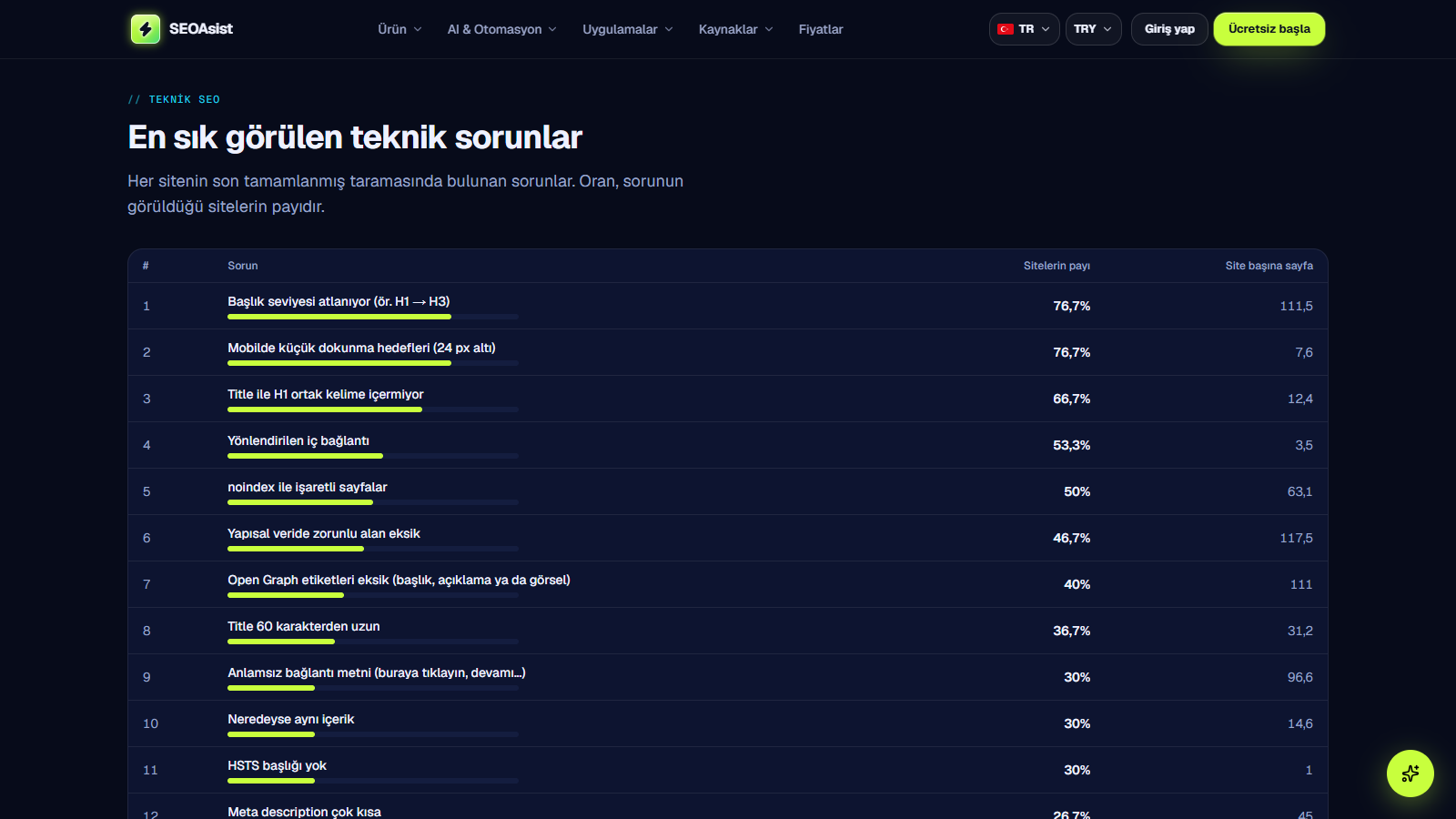
We publish, anonymously and in aggregate, which problems are how common on the sites SEOAsist scans on the SEO data report page. There are no site names or values belonging to a single site; the figures are refreshed every day.
One of the new rules is near the top of the report: small tap targets on mobile were seen on 76.7% of the scanned sites. This shows that the new checks catch real and widespread problems.
How do you see the new checks in your SEO audit?
No extra setup is needed. On the site's next crawl the new rules run automatically, and findings appear on the Audit page in order of importance. Newly added checks do not trigger an "increased compared to the previous crawl" alarm; they are simply listed when they first appear. You can also try a first scan of your own site on a single page with the free SEO audit tool, and see results from real sites on the success stories page.
Frequently asked questions
Do I need to configure anything for the new checks?
No. On the site's next crawl the new rules run automatically and the findings appear on the Audit page.
Will my JavaScript-based site be evaluated correctly?
Yes. If the HTML coming from the server is an app shell, the page is opened in a real Chromium browser and the content is audited the way a visitor sees it.
Why is redirecting based on browser language a problem?
It sends visitors and some crawlers to another language instead of the version they asked for, which makes the other versions harder to reach. The right approach is to show the requested page and offer the other language with a suggestion banner.
Will the new rules suddenly increase the issue count?
The new rules may add new findings on the first crawl, but they do not trigger an "increased compared to the previous crawl" alarm; comparisons are made with the same rule set.
